「Input」の版間の差分
| 70行目: | 70行目: | ||
:<math>n_j=n_j^0+\sum_{l=1}^{lmax} \frac{A}{\nu_l-\nu-i\gamma}</math> | :<math>n_j=n_j^0+\sum_{l=1}^{lmax} \frac{A}{\nu_l-\nu-i\gamma}</math> | ||
:The default is set to “NO” like below. | :The default is set to “NO” like below. | ||
: [[File: | : [[File:manual_input11_no.png|500px]] | ||
:In this pattern, the parameters are assigned automatically. | :In this pattern, the parameters are assigned automatically. | ||
:If you select “YES” like below. | :If you select “YES” like below. | ||
: [[File:manual_input11_yes|500px]] | : [[File:manual_input11_yes.png|500px]] | ||
:The new input field is set, and you can give the number of Lorentz function like below | :The new input field is set, and you can give the number of Lorentz function like below | ||
: [[File:manual_input11_yes_num |500px]] | : [[File:manual_input11_yes_num.png|500px]] | ||
:Above, the number is set to 1. So, the three set of parameter of Lorentz function is need to input. init_A1, init_N1 and init_G1 are the amplitude, peak wavenumber, and bandwidth of each Lorentz function, respectively. | :Above, the number is set to 1. So, the three set of parameter of Lorentz function is need to input. init_A1, init_N1 and init_G1 are the amplitude, peak wavenumber, and bandwidth of each Lorentz function, respectively. | ||
2021年12月19日 (日) 06:39時点における版
- This is the name of the output file. You can input freely. The default is set to ‘no-title’.
- You set the result file obtained from the ATR-IR experiment. The format is like below.
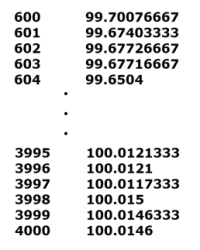
- There are three rules for the format of input file.
- First, the extension of input file must be the .txt.
- Second, the wavenumber and the corresponding reflectance or the absorptance are ordered in the columns respectively, and counterparts are in the same line.
- Third, the columns are separated by the space.

- In the input file, there should be the wavenumber and the corresponding absorptance or reflectance. Please, input which data is written in your input file.
- There are two options.
- First, it is reflectance.
- Second, it is absorptance.
- The default is set to the first option.
- In the input file, there may be all range of the wavenumber and corresponding data obtained from the ATR-IR experiment. Here, you input the range of the wavenumber to fit the reflectance spectra. ComplexRI execute the fitting only in the range you input here.
- The default is set to from 1636 to 1863.
In the input file, there may be some columns of the wavenumber and corresponding data obtained from the ATR-IR experiment, but the columns necessary for the fitting is only two.
- First, it is the wavenumber, and second, it is the representative absorptance or reflectance corresponding the former.
- For example, there is the input file like below.(You can download this file from Manual Page in ComplexRI. The file name is File03)
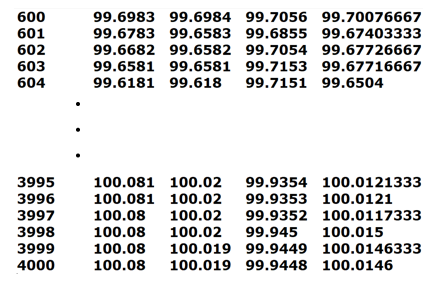
- There are five columns. The first is the wavenumber, the others are all reflectance. The fifth is average of the second, the third and the forth. In this situation, when you input like below, you can get the better fitting result.
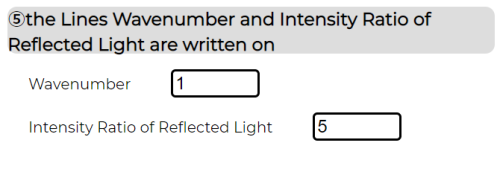
- The default is set to the wavenumber to the first column and the reflectance or the absorptance to second column respectively.


- You should input how the data is ordered in the input file. There are two patterns, ascending order or descending order. They are like below. The left is ascending, and the right is descending.
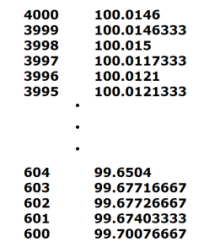
- The default is set to the descending order.

- You should input the refractive index of the substrate you use in the ATR-IR experiment. Here, we prepare the three substrates often used.
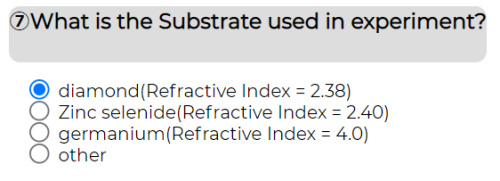
- So, if there is the substrate you use, you only have to select the substrate name. It gives the corresponding refractive index. The values are written in the parenthesis next to the substrate name.

- Otherwise, you should select other and, input the refractive index manually.
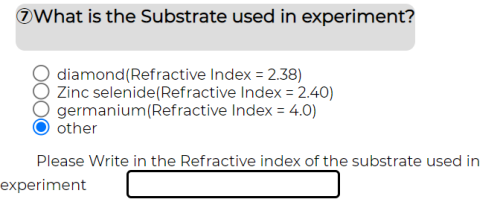
- You can also use this option, when you want to input the refractive index strictly against the three substrates often used.

- You should input the angle of incidence of IR light.

- That is 構文解析に失敗 (MathML、ただし動作しない場合はSVGかPNGで代替(最新ブラウザーや補助ツールに推奨): サーバー「https://wikimedia.org/api/rest_v1/」から無効な応答 ("Math extension cannot connect to Restbase."):): {\displaystyle {\theta}_i} in the above picture.
- The default is set to 45 degree.
- You should input the refractive index without dispersion. This value is derived from the cauchys equation showed below.
- 構文解析に失敗 (MathML、ただし動作しない場合はSVGかPNGで代替(最新ブラウザーや補助ツールに推奨): サーバー「https://wikimedia.org/api/rest_v1/」から無効な応答 ("Math extension cannot connect to Restbase."):): {\displaystyle n = A + \frac{B}{{\lambda}^2} + \frac{C}{{\lambda}^4}}
This value usually converges in the IR region. So, you can get this value by substitution of appropriate構文解析に失敗 (MathML、ただし動作しない場合はSVGかPNGで代替(最新ブラウザーや補助ツールに推奨): サーバー「https://wikimedia.org/api/rest_v1/」から無効な応答 ("Math extension cannot connect to Restbase."):): {\displaystyle \lambda} and 構文解析に失敗 (MathML、ただし動作しない場合はSVGかPNGで代替(最新ブラウザーや補助ツールに推奨): サーバー「https://wikimedia.org/api/rest_v1/」から無効な応答 ("Math extension cannot connect to Restbase."):): {\displaystyle A, B, C} parameter corresponding to the substrate for the above equation.
- The default is set to 1.360.
- The value input here is used to judge if the fitting of reflectance spectra should finish. The detail is written in the explanation01 of Internal processing.
- The defalut is set to 0.02.
- notice!! If this value is too small, fitting cannot finish.
- Here, you can select whether you decide the parameter of fitting functions. We use a set of Lorentz function for fitting of Reflectance spectra as mentioned in the
explanation01 of Internal processing . Fitting function is like below.
- The default is set to “NO” like below.

- In this pattern, the parameters are assigned automatically.
- If you select “YES” like below.
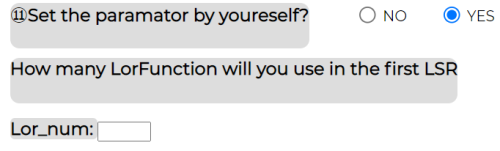
- The new input field is set, and you can give the number of Lorentz function like below
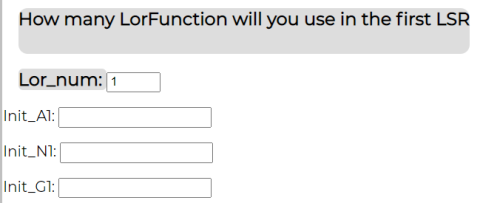
- Above, the number is set to 1. So, the three set of parameter of Lorentz function is need to input. init_A1, init_N1 and init_G1 are the amplitude, peak wavenumber, and bandwidth of each Lorentz function, respectively.


